安卓逆向学习笔记(一)
安卓逆向第一课
目录
第一课,老师是教我们写一个Android程序,这是一个很简单的登录界面。
我们首先下载需要使用的软件Android Studio
下载按照教程一步一步将AS安装好。
下载好之后,因为我没有接触过这个软件也没有玩过开发,所以刚刚开始的时候有点不知道怎么用这个软件。
但是没关系。学逆向的人内心是应该有这些准备的。
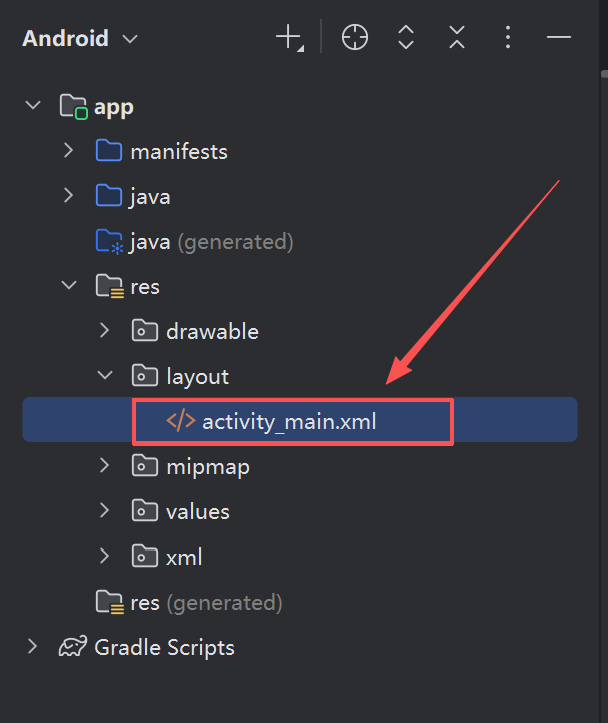
我们找到activity_main.xml文件,这个文件在app/res/layout/activity_main.xml,我第一次的时候没有找到这个文件,原因就是我新建的文件不是Empty Views Activity,导致没有这个文件。
创建好之后,我们可以打开Design界面,通过拖拽完成我们的界面。
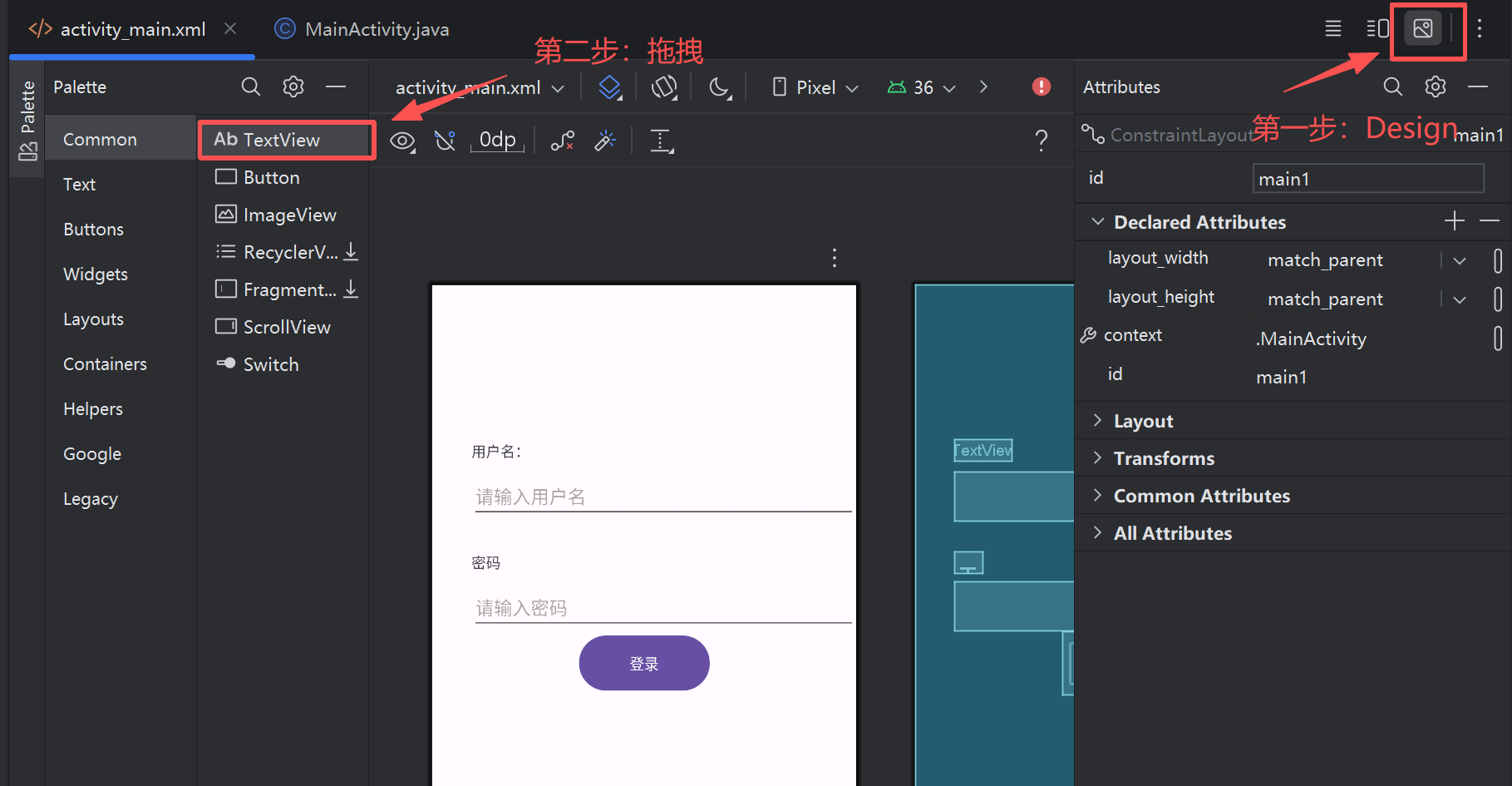
不知道为什么我没有Exit View,虽然没有,我们也可以在activity_main.xml里面添加。
这里需要注意的是,尽管这个软件是支持拖拽的,但是,我们设计好之后也是需要稍微修改一下的。
我们简单解释一下activity_main.xml里的代码吧(感觉在写html orz)
1
2
3
4
5
6
7
8
9
10
11
12
13
14
15
16
17
18
19
20
21
22
23
24
25
26
27
28
29
30
31
32
33
34
35
36
37
38
39
40
41
42
43
44
45
46
47
48
49
50
51
52
53
54
55
56
57
58
59
60
61
62
63
64
65
66
67
68
| <?xml version="1.0" encoding="utf-8"?>
<androidx.constraintlayout.widget.ConstraintLayout xmlns:android="http://schemas.android.com/apk/res/android"
xmlns:app="http://schemas.android.com/apk/res-auto"
xmlns:tools="http://schemas.android.com/tools"
android:id="@+id/main1"
android:layout_width="match_parent"
android:layout_height="match_parent"
tools:context=".MainActivity">
<TextView
android:id="@+id/username"
android:layout_width="wrap_content"
android:layout_height="wrap_content"
android:layout_marginStart="38dp"
android:layout_marginTop="150dp"
android:text="用户名:"
app:layout_constraintStart_toStartOf="parent"
app:layout_constraintTop_toTopOf="parent" />
<EditText
android:id="@+id/TEXT_NAME"
android:layout_width="0dp"
android:layout_height="wrap_content"
android:layout_marginStart="38dp"
android:layout_marginTop="10dp"
android:hint="请输入用户名"
app:layout_constraintEnd_toEndOf="parent"
app:layout_constraintStart_toStartOf="parent"
app:layout_constraintTop_toBottomOf="@id/username" />
<TextView
android:id="@+id/password"
android:layout_width="wrap_content"
android:layout_height="wrap_content"
android:layout_marginStart="38dp"
android:layout_marginTop="30dp"
android:text="密码"
app:layout_constraintStart_toStartOf="parent"
app:layout_constraintTop_toBottomOf="@id/TEXT_NAME" />
<EditText
android:id="@+id/TEST_PASS"
android:layout_width="0dp"
android:layout_height="wrap_content"
android:layout_marginStart="38dp"
android:layout_marginTop="10dp"
android:hint="请输入密码"
android:inputType="textPassword"
app:layout_constraintEnd_toEndOf="parent"
app:layout_constraintStart_toStartOf="parent"
app:layout_constraintTop_toBottomOf="@id/password" />
<Button
android:id="@+id/BTN_LOGIN"
android:layout_width="127dp"
android:layout_height="60dp"
android:text="登录"
app:layout_constraintStart_toStartOf="parent"
app:layout_constraintTop_toBottomOf="@id/TEST_PASS"
app:layout_constraintEnd_toEndOf="parent" />
</androidx.constraintlayout.widget.ConstraintLayout>
|
用户名标签:TextView
android:id="@+id/username":为这个TextView定义一个ID,便于后续在JAVA代码中引用。android:layout_width="wrap_content":表示TextView的宽度会根据文本内容自动调整。android:layout_marginStart="38dp":为TextView左侧设置38dp的间距。android:layout_marginTop="150dp":为TextView顶部设置150dp的间距。android:text="用户名:":设置标签文本为用户名:
用户名输入框:ExitText
android:layout_width="0dp":当使用0dp时,意味着宽度由约束决定,这里会根据左右约束(start和end)的定影来确定宽度。android:layout_height="wrap_content":高度自适应内容。android:layout_marginStart="38dp":左侧有38dp的间距。android:layout_marginTop="10dp":顶部与用户名标签之间有10dp的间距。android:hint="请输入用户名":显示提示文本。app:layout_constraintEnd_toEndOf="parent":将输入框的右视图与父视图对齐。app:layout_constraintStart_toStartOf="parent":将输入框的左侧与父视图对齐。app:layout_constraintTop_toBottomOf="@id/username":将输入框的顶部与用户名标签的底部对齐。
完成之后的界面在上图也可以看见,这里我不再截图了。
在mainactivity中,我们可以看到一个检查函数,当我们输入正确的账号密码时就可以登录成功。
用AS编写一个包含姓名 年龄 生日 邮箱 兴趣爱好的用户注册页面 要求:点击注册按钮会把注册的信息显示在另一个页面上
根据题目我们可以知道这是2个页面,一个是我们的注册页面,一个是跳转后的显示页面。那就意味着我们需要两个project
activity_main.xml
1
2
3
4
5
6
7
8
9
10
11
12
13
14
15
16
17
18
19
20
21
22
23
24
25
26
27
28
29
30
31
32
33
34
35
36
37
38
39
40
41
42
43
44
45
46
47
48
49
50
51
52
53
54
55
56
57
58
59
60
61
62
63
64
65
66
67
68
69
70
71
72
73
74
75
76
77
78
79
80
81
82
83
84
85
86
87
88
89
90
91
92
93
94
95
96
97
98
99
100
101
102
103
104
105
106
107
108
109
110
111
112
113
114
115
116
117
118
119
120
121
122
123
124
| <?xml version="1.0" encoding="utf-8"?>
<androidx.constraintlayout.widget.ConstraintLayout xmlns:android="http://schemas.android.com/apk/res/android"
xmlns:app="http://schemas.android.com/apk/res-auto"
xmlns:tools="http://schemas.android.com/tools"
android:id="@+id/main"
android:layout_width="match_parent"
android:layout_height="match_parent"
android:padding="20dp"
tools:context=".MainActivity">
<TextView
android:id="@+id/NAME"
android:layout_width="wrap_content"
android:layout_height="wrap_content"
android:layout_marginStart="4dp"
android:layout_marginTop="24dp"
android:text="姓名:"
app:layout_constraintBottom_toBottomOf="parent"
app:layout_constraintEnd_toEndOf="parent"
app:layout_constraintHorizontal_bias="0.0"
app:layout_constraintStart_toStartOf="parent"
app:layout_constraintTop_toTopOf="parent"
app:layout_constraintVertical_bias="0.066" />
<EditText
android:id="@+id/ET_NAME"
android:layout_width="0dp"
android:layout_height="wrap_content"
android:hint="输入姓名"
app:layout_constraintBaseline_toBaselineOf="@id/NAME"
app:layout_constraintEnd_toEndOf="parent"
app:layout_constraintHorizontal_bias="0.0"
app:layout_constraintStart_toEndOf="@id/NAME" />
<TextView
android:id="@+id/AGE"
android:layout_width="wrap_content"
android:layout_height="wrap_content"
android:layout_marginStart="4dp"
android:layout_marginTop="24dp"
android:text="年龄:"
app:layout_constraintStart_toStartOf="parent"
app:layout_constraintTop_toBottomOf="@id/ET_NAME" />
<EditText
android:id="@+id/ET_AGE"
android:layout_width="0dp"
android:layout_height="wrap_content"
android:hint="输入年龄"
app:layout_constraintBaseline_toBaselineOf="@id/AGE"
app:layout_constraintEnd_toEndOf="parent"
app:layout_constraintStart_toEndOf="@id/AGE" />
<TextView
android:id="@+id/BIRTHDAY"
android:layout_width="wrap_content"
android:layout_height="wrap_content"
android:layout_marginStart="4dp"
android:layout_marginTop="24dp"
android:text="生日:"
app:layout_constraintStart_toStartOf="parent"
app:layout_constraintTop_toBottomOf="@id/ET_AGE" />
<EditText
android:id="@+id/ET_BIRTHDAY"
android:layout_width="0dp"
android:layout_height="wrap_content"
android:hint="输入生日"
app:layout_constraintBaseline_toBaselineOf="@id/BIRTHDAY"
app:layout_constraintEnd_toEndOf="parent"
app:layout_constraintStart_toEndOf="@id/BIRTHDAY" />
<TextView
android:id="@+id/EMAIL"
android:layout_width="wrap_content"
android:layout_height="wrap_content"
android:layout_marginStart="4dp"
android:layout_marginTop="24dp"
android:text="邮箱:"
app:layout_constraintStart_toStartOf="parent"
app:layout_constraintTop_toBottomOf="@id/ET_BIRTHDAY" />
<EditText
android:id="@+id/ET_EMAIL"
android:layout_width="0dp"
android:layout_height="wrap_content"
android:hint="输入邮箱"
app:layout_constraintBaseline_toBaselineOf="@+id/EMAIL"
app:layout_constraintEnd_toEndOf="parent"
app:layout_constraintHorizontal_bias="1.0"
app:layout_constraintStart_toEndOf="@id/EMAIL" />
<TextView
android:id="@+id/HABIT"
android:layout_width="wrap_content"
android:layout_height="wrap_content"
android:layout_marginStart="4dp"
android:layout_marginTop="24dp"
android:text="爱好:"
app:layout_constraintStart_toStartOf="parent"
app:layout_constraintTop_toBottomOf="@id/ET_EMAIL" />
<EditText
android:id="@+id/ET_HABIT"
android:layout_width="0dp"
android:layout_height="wrap_content"
android:hint="输入爱好"
app:layout_constraintBaseline_toBaselineOf="@id/HABIT"
app:layout_constraintEnd_toEndOf="parent"
app:layout_constraintStart_toEndOf="@id/HABIT" />
<Button
android:id="@+id/REGISTER"
android:layout_width="wrap_content"
android:layout_height="wrap_content"
android:layout_marginStart="140dp"
android:layout_marginTop="92dp"
android:text="注 册"
app:layout_constraintStart_toStartOf="parent"
app:layout_constraintTop_toBottomOf="@id/ET_HABIT" />
/>
</androidx.constraintlayout.widget.ConstraintLayout>
|
MainActivity.java
1
2
3
4
5
6
7
8
9
10
11
12
13
14
15
16
17
18
19
20
21
22
23
24
25
26
27
28
29
30
31
32
33
34
35
36
37
38
39
40
41
42
43
44
45
46
47
48
49
50
51
52
53
54
55
| package com.example.selectwork;
import android.content.Intent;
import android.os.Bundle;
import android.widget.Button;
import android.widget.EditText;
import androidx.activity.EdgeToEdge;
import androidx.appcompat.app.AppCompatActivity;
import androidx.core.graphics.Insets;
import androidx.core.view.ViewCompat;
import androidx.core.view.WindowInsetsCompat;
public class MainActivity extends AppCompatActivity {
@Override
protected void onCreate(Bundle savedInstanceState) {
super.onCreate(savedInstanceState);
EdgeToEdge.enable(this);
setContentView(R.layout.activity_main);
EditText etName = findViewById(R.id.ET_NAME);
EditText etAge = findViewById(R.id.ET_AGE);
EditText etBirthday = findViewById(R.id.ET_BIRTHDAY);
EditText etEmail = findViewById(R.id.ET_EMAIL);
EditText etHabit = findViewById(R.id.ET_HABIT);
Button registerButton = findViewById(R.id.REGISTER);
registerButton.setOnClickListener(v -> {
String name = etName.getText().toString();
String age = etAge.getText().toString();
String birthday = etBirthday.getText().toString();
String email = etEmail.getText().toString();
String habit = etHabit.getText().toString();
Intent intent = new Intent(MainActivity.this, ResultActivity.class);
intent.putExtra("NAME", name);
intent.putExtra("AGE", age);
intent.putExtra("BIRTHDAY", birthday);
intent.putExtra("EMAIL", email);
intent.putExtra("HABIT", habit);
startActivity(intent);
});
ViewCompat.setOnApplyWindowInsetsListener(findViewById(R.id.main), (v, insets) -> {
Insets systemBars = insets.getInsets(WindowInsetsCompat.Type.systemBars());
v.setPadding(systemBars.left, systemBars.top, systemBars.right, systemBars.bottom);
return insets;
});
}
}
|
activity_result.xml
1
2
3
4
5
6
7
8
9
10
11
12
13
14
15
16
17
18
19
20
| <?xml version="1.0" encoding="utf-8"?>
<androidx.constraintlayout.widget.ConstraintLayout xmlns:android="http://schemas.android.com/apk/res/android"
xmlns:app="http://schemas.android.com/apk/res-auto"
xmlns:tools="http://schemas.android.com/tools"
android:id="@+id/main"
android:layout_width="match_parent"
android:layout_height="match_parent"
tools:context=".ResultActivity">
<TextView
android:id="@+id/resultTextView"
android:layout_width="wrap_content"
android:layout_height="wrap_content"
android:text="用户信息"
android:textSize="18sp"
android:layout_marginTop="20dp"
app:layout_constraintTop_toTopOf="parent"
app:layout_constraintStart_toStartOf="parent"
app:layout_constraintEnd_toEndOf="parent" />
</androidx.constraintlayout.widget.ConstraintLayout>
|
ResultActivity.java
1
2
3
4
5
6
7
8
9
10
11
12
13
14
15
16
17
18
19
20
21
22
23
24
25
26
27
28
29
30
31
32
33
34
35
36
37
38
| package com.example.selectwork;
import android.os.Bundle;
import android.widget.TextView;
import androidx.activity.EdgeToEdge;
import androidx.appcompat.app.AppCompatActivity;
import androidx.core.graphics.Insets;
import androidx.core.view.ViewCompat;
import androidx.core.view.WindowInsetsCompat;
public class ResultActivity extends AppCompatActivity {
@Override
protected void onCreate(Bundle savedInstanceState) {
super.onCreate(savedInstanceState);
EdgeToEdge.enable(this);
setContentView(R.layout.activity_result);
String name = getIntent().getStringExtra("NAME");
String age = getIntent().getStringExtra("AGE");
String birthday = getIntent().getStringExtra("BIRTHDAY");
String email = getIntent().getStringExtra("EMAIL");
String habit = getIntent().getStringExtra("HABIT");
TextView resultTextView = findViewById(R.id.resultTextView);
String result = "姓名: " + name + "\n" +
"年龄: " + age + "\n" +
"生日: " + birthday + "\n" +
"邮箱: " + email + "\n" +
"爱好: " + habit;
resultTextView.setText(result);
}
}
|
注册页面:
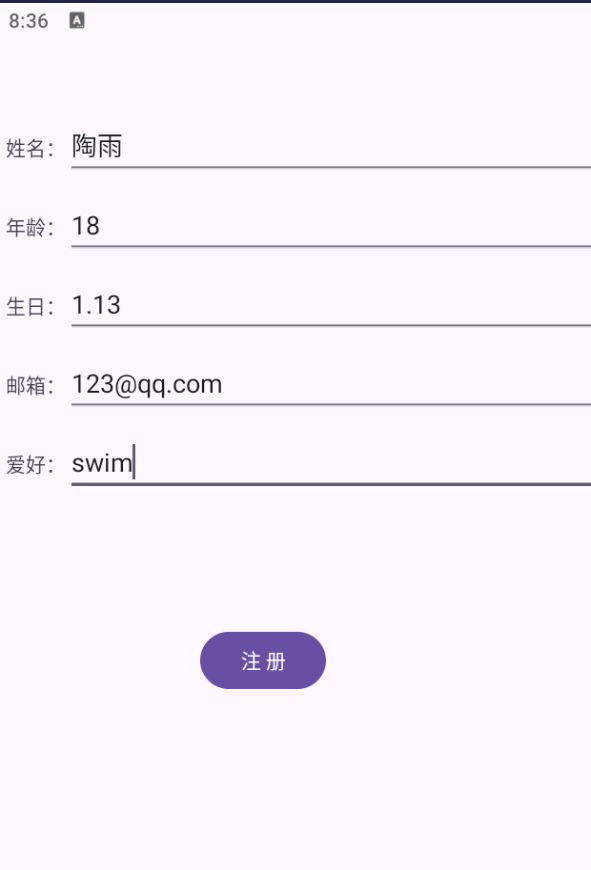
跳转页面:

虽然是一个很小的登录页面,也是需要我去认真对待的,在这之间我遇到了很多问题,导致我并没有完成这个登录页面,也并没有完成课后的作业,直接就去看第二次课程的文档了,在第二次文档中,看见老师写的一些话,我很受触动,又返回继续写了。其实写完之后发现也就那样啊,没什么难的。
我觉得人的潜力是可以被突破的,千万不要自己局限住自己,当我们选择了逆向这条路,就注定不是一帆风顺的,我们要做好面对各种困难的准备,一定不要因为一些问题就放弃,这是我们成为大佬的必经之路!!!!